Markup Calculator: Set Prices From Markup or Margin
This free markup calculator finds the right selling price from your cost and target markup or margin, or shows the markup and margin on a price you already charge. It also shows profit per unit and total gross profit, so you can see exactly what each price earns.
Who it's for: Retailers, e-commerce sellers, wholesalers, makers, and service businesses that resell products and need to price them profitably.
Why use it:
- Markup vs. margin, solved: See both numbers for every price and avoid a costly mix-up.
- Three ways to calculate: Price from markup, price from margin, or check an existing price.
- Profit at a glance: See profit per unit and total gross profit for your sales volume.
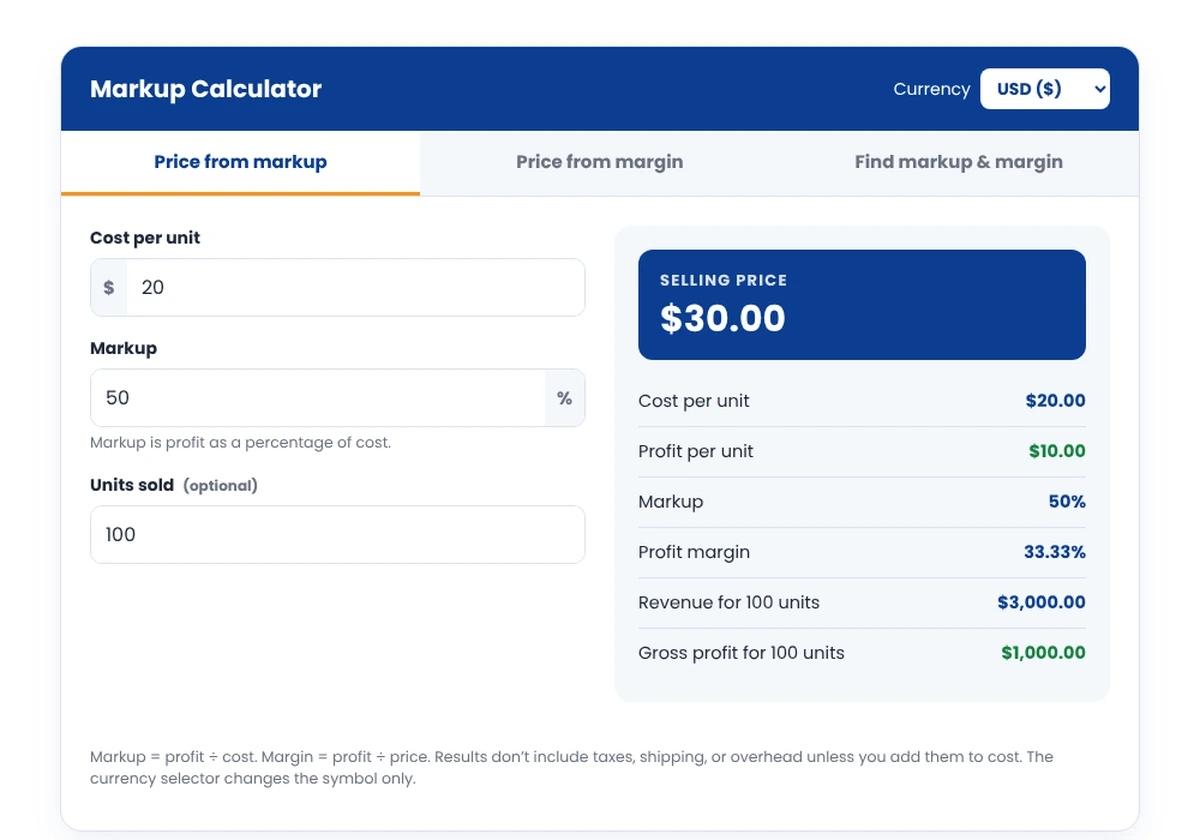
Markup Calculator
Markup = profit ÷ cost. Margin = profit ÷ price. Results don’t include taxes, shipping, or overhead unless you add them to cost. The currency selector changes the symbol only.
How to Use the Markup Calculator
- Pick a tab. Use "Price from markup" or "Price from margin" to set a price, or "Find markup & margin" to check a price you already have.
- Enter your cost per unit, including materials, packaging, and inbound shipping.
- Enter your markup, margin, or price.
- Add units sold to see total revenue and gross profit.
- Compare markup and margin in the results to make sure your price hits your goal.
How It Works
Markup and margin both measure profit, but against different numbers. Markup compares profit to cost. Margin compares profit to the selling price. That's why the same price always shows a higher markup than margin.
Profit = Price − Cost
Markup = Profit ÷ Cost × 100
Margin = Profit ÷ Price × 100
Price from markup = Cost × (1 + Markup)
Price from margin = Cost ÷ (1 − Margin)
Margin = Markup ÷ (1 + Markup)
A margin can never reach 100%, because that would mean the product cost nothing. Markup has no upper limit.
Worked Example
A store buys a product for $20.
- A 50% markup gives a price of $30, which is only a 33.33% margin
- To earn a 40% margin, the price must be $33.33, a 66.67% markup
- To earn a 50% margin, the price must be $40, a 100% markup
- At a $35 price: profit $15, markup 75%, margin 42.86%
Mixing up markup and margin is a common pricing mistake: a 50% markup is not a 50% margin.
Markup vs. Margin Conversion
| Markup | Equivalent margin | Price on a $20 cost |
|---|---|---|
| 25% | 20% | $25.00 |
| 50% | 33.33% | $30.00 |
| 66.67% | 40% | $33.33 |
| 100% | 50% | $40.00 |
| 150% | 60% | $50.00 |
| 200% | 66.67% | $60.00 |
Where to Find Your Numbers
- Cost per unit: supplier invoices plus packaging, inbound freight, duties, and payment fees for each unit.
- Target margin: your business plan, or the gross margin you need to cover overhead. Our break-even calculator shows how margin affects break-even.
- Current price: your price list or online store.
- Units sold: your sales report for a recent month.
What the Calculator Can and Cannot Tell You
It can tell you
- The price needed to hit a markup or margin
- The markup and margin on an existing price
- Gross profit per unit and in total
- How markup and margin convert
It cannot tell you
- Whether customers will accept the price
- Your net profit after overhead and taxes
- Competitor pricing in your market
- Discounts, returns, or promotions
Frequently Asked Questions
What is the difference between markup and margin?
Markup is profit as a percentage of cost; margin is profit as a percentage of the selling price. A product that costs $20 and sells for $30 has a 50% markup but a 33.33% margin. Both describe the same $10 profit, just measured against different numbers.
What is a good markup for a small business?
It varies widely by industry. Retailers often aim for higher markups on low-volume items and lower markups on high-volume ones. Instead of copying a rule of thumb, work backward from the margin you need to cover overhead and profit, then check that customers will pay that price.
How do I convert markup to margin?
Divide the markup by one plus the markup. A 50% markup is 0.5 ÷ 1.5, or a 33.33% margin. To go the other way, divide the margin by one minus the margin: a 40% margin is 0.4 ÷ 0.6, or a 66.67% markup.
Should shipping be included in cost?
Include inbound shipping, duties, and packaging in your cost per unit, since you pay them to get the product ready to sell. If you charge customers for outbound shipping separately, leave it out; if you offer free shipping, add your average shipping cost to each unit.
Why can't a margin be 100% or more?
Because margin is profit divided by price, and profit can never be larger than the price unless the cost is negative. A 100% margin would mean the product cost nothing. Markup has no such limit, which is why big markups are possible.
Final Takeaway
Set prices from the margin you need, not just a markup habit. Then test whether the market will pay. If you sell online, our guides on how to start an ecommerce business and how to import products show the costs to include before you price.
Sources: Markup and margin formulas are standard accounting definitions. Example figures are illustrative.