Quick answer: To invoice a client, list your business and client details, a unique invoice number, the invoice date, and each product or service with its price. Add taxes, the total due, the due date, payment terms, and payment methods. Send it promptly, offer electronic payment, and follow up on a set schedule.
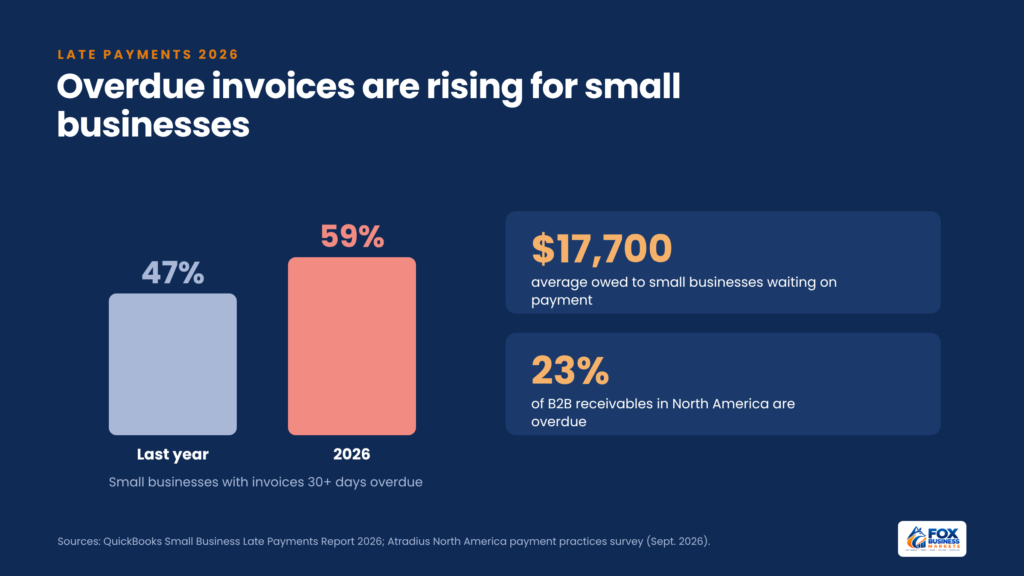
Late payments are getting worse for small businesses. Nearly 3 in 5 small businesses (59%) surveyed for the 2026 QuickBooks Small Business Late Payments Report had invoices more than 30 days overdue, up from 47% the year before. Those with unpaid invoices were owed $17,700 on average.
Many of those delays start with the invoice itself. A missing purchase order number, a vague description, or unclear payment instructions gives a client’s accounts payable team a reason to set your bill aside. A clear, complete invoice sent at the right time, with easy ways to pay, removes those excuses.
This guide shows how to invoice clients step by step, what every invoice should include, how to choose payment terms and late fees, when and how to send invoices, and how to follow up when a client pays late. For an overview of how payments move once a client pays, see our guide to payment processing.
What Is an Invoice?
An invoice is a document a seller sends a buyer to request payment for goods or services delivered. It lists what was provided, what it costs, when payment is due, and how to pay.
Invoices do three jobs:
- Request payment and set clear expectations for when and how to pay.
- Create a record of the sale for your bookkeeping, taxes, and any dispute.
- Track what you’re owed, because unpaid invoices make up your accounts receivable.
An invoice is different from a receipt. An invoice asks for payment; a receipt confirms payment has been made. It’s also different from a quote or estimate, which describes a proposed price before work begins.
What Should an Invoice Include?
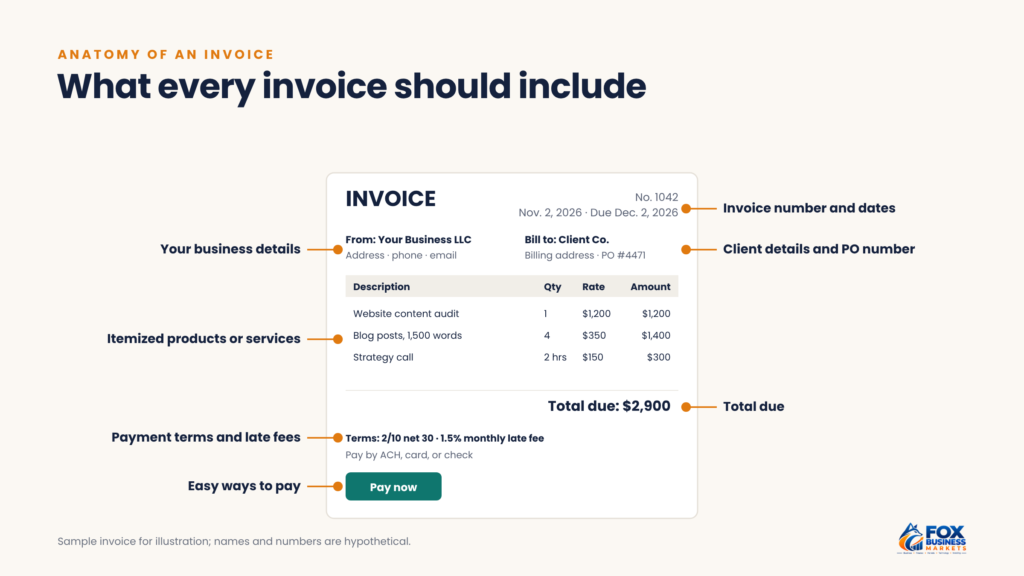
Every invoice should include these elements:
Element | Why it’s needed |
| The word “Invoice” | Makes the document’s purpose clear to the client’s accounts team |
| Your business name, address, phone, and email | Identifies who’s billing and how to reach you |
| Client’s name, company, and billing address | Makes sure the invoice reaches the right person |
| Unique invoice number | Helps both sides track and reference the bill |
| Invoice date | Starts the clock on your payment terms |
| Due date | Tells the client exactly when payment is expected |
| Purchase order (PO) number, if the client uses one | Many companies won’t pay without it |
| Itemized list of products or services | Shows what the client is paying for |
| Quantity, rate, and line totals | Lets the client check your math |
| Subtotal, discounts, taxes, and total due | Shows the final amount clearly |
| Payment terms | Sets the deadline, late fees, and early-payment discounts |
| Payment methods and instructions | Makes it easy to pay right away |
Optional but useful additions include your logo, a short thank-you note, your tax ID if clients request it, and a reference to the contract or project.
How Do You Create an Invoice Step by Step?
Learning how to invoice takes nine steps. Once your template is set up, you’ll repeat steps 3 through 9 for each new bill.
- Choose your invoicing tool. Use accounting software, invoicing software, a payment processor’s invoicing feature, or a template in a word processor or spreadsheet. Software saves time and tracks payments automatically (see the software checklist below).
- Add your business details. Include your legal business name, address, and contact information, plus your logo if you have one.
- Add the client’s details. Use the billing contact and address from your contract or the client’s vendor setup form.
- Assign an invoice number. Use a consistent system, such as sequential numbers (1001, 1002) or a client code plus a number (ACME-0042). Never reuse a number.
- Enter the invoice date and due date. Calculate the due date from your payment terms, such as 30 days after the invoice date for net 30.
- List each item. Describe the product or service, the date or period it covers, the quantity or hours, the rate, and the line total.
- Calculate the total. Add the subtotal, apply any discounts, add sales tax if it applies, and show the total due.
- State payment terms and methods. Include the due date, any late fee, any early-payment discount, and how to pay.
- Review and send. Check the client’s name, PO number, amounts, and math, then send the invoice to the right billing contact.
Invoice example
A simple invoice for a freelance marketing consultant might look like this:
Description | Quantity | Rate | Amount |
| Website content audit (October 2026) | 1 project | $1,200 | $1,200 |
| Blog posts, 1,500 words | 4 | $350 | $1,400 |
| Strategy call | 2 hours | $150 | $300 |
| Total due by December 2, 2026 | $2,900 | ||
| Early-payment option: pay by November 12, 2026, and deduct 2% ($58) | $2,842 |
Invoice number 1042, dated November 2, 2026, with payment terms of 2/10 net 30: the client owes $2,900 by December 2, 2026, or can pay $2,842 by November 12 to take the 2% discount. Pay by ACH, card, or check, with instructions below the total.
Which Type of Invoice Should You Send?
How to invoice depends on the kind of work and where you are in the project. Most businesses use these types:
Invoice type | When to use it |
| Standard | For one-time sales or projects billed after delivery |
| Proforma | Before work or shipment, so the client can approve the cost or arrange payment; it previews the bill and isn’t recorded as a sale |
| Recurring | For the same amount on a regular schedule, such as a monthly retainer |
| Progress | For partial billing on long projects as milestones are completed |
| Final | At the end of a project, showing the full contract value, payments already received, and the remaining balance |
| Past-due | For an overdue balance, marked “past due” with the original invoice date, days overdue, and any late fee |
| Credit memo | To reduce what a client owes after a return, refund, overcharge, or billing error |
Label the type at the top of the document so the client’s accounts payable team knows how to process it, and reference the original invoice number on any credit memo, past-due notice, or final invoice.
What Should You Look for in Invoicing Software?
Use this checklist to compare tools:
- Templates you can customize with your logo, payment terms, and fields such as PO numbers
- Built-in ACH and card payments with a “pay now” link
- Automatic reminders and recurring invoices
- Integration with your accounting software, so payments post to your books
- Receivables reports that show what’s overdue and how long clients take to pay
- Sales tax calculation and multiple currencies, if you need them
- Clear pricing for both the software and per-transaction payment fees
Before you commit, send yourself a test invoice and pay it to see what your clients will experience.
What Payment Terms Should You Use?
Payment terms tell clients when payment is due and what happens if it’s late or early. Common terms include:
Term | Meaning |
| Due on receipt | Payment is due as soon as the client receives the invoice |
| Net 15 / net 30 / net 60 | Payment is due 15, 30, or 60 days after the invoice date |
| 2/10 net 30 | A 2% discount if paid within 10 days; otherwise the full amount is due in 30 days |
| End of month (EOM) | Payment is due at the end of the month the invoice is issued, or a set number of days after it (for example, net 10 EOM) |
| 50% upfront | Half is paid before work starts, and the rest on completion |
| Milestone payments | Payments are tied to project stages |
Shorter terms improve your cash flow, but larger clients often insist on net 30 or longer. Agree on terms in your contract before work begins, then repeat them on every invoice. For new clients or large projects, ask for a deposit upfront.
Early-payment discounts can speed up collections, but they cost you. A 2/10 net 30 discount on a $2,900 invoice costs $58 to get paid 20 days early. That works out to roughly 37% a year. Use it when faster cash is worth more to you than the discount.
Should You Charge Late Fees?
Late fees can encourage on-time payment, but only if you set them up correctly:
- Put them in your contract. A late fee is easiest to enforce when the client agreed to it before work began.
- Show them on every invoice, for example, “A late fee of 1.5% per month applies to balances unpaid after the due date.”
- Check state law. States limit how much interest or late fees businesses can charge, and rules vary. Confirm the maximum your state allows before you set a rate.
- Apply them consistently, but use judgment with long-standing clients who pay late once.
- Consider a flat fee for small invoices, where a percentage would be tiny.
A late fee is a tool, not a guarantee. Clear terms, easy payment options, and prompt reminders usually do more to get you paid than penalties.
When Should You Send an Invoice?
Send invoices as soon as you’ve earned the payment. Every day you wait delays the payment clock. Common timing:
- Immediately after delivery for one-time products or projects.
- On a set date each month for ongoing services, such as the first business day of the month.
- At each milestone for long projects with staged payments.
- Before work begins for retainers or deposits.
Send invoices to the person who approves payment, usually the accounts payable team, and copy your main contact. Ask new clients how they want to receive invoices.
How Does Invoicing Differ for Freelancers and Larger Clients?
Freelancers often bill the same person who hired them, by email or through invoicing software. Keep the invoice personal but complete: name the project, reference the agreed rate, and include a payment link.
Larger companies often require vendors to register in a supplier portal and submit invoices there rather than by email. Before your first invoice, ask whether the client uses a portal, what it requires, such as banking details and a PO number, and who approves invoices. An invoice emailed outside the portal may never reach the payment queue.
Some large clients and government agencies also require e-invoicing, which sends invoice data in a structured format their systems can read automatically. Your invoicing software or the client’s portal usually handles the format.
How Can You Get Paid Faster?
- Offer electronic payments. Include links or details for ACH bank transfers and cards on every invoice. ACH costs far less than cards on large invoices; our guide to ACH payments explains how to set it up.
- Make paying easy. A “pay now” button lets clients pay in seconds instead of entering details by hand.
- Double-check every invoice. Errors are a common reason for delays.
- Use automatic reminders. Most invoicing software can send reminders before and after the due date.
- Set up recurring billing for regular services, with automatic payments where clients agree.
- Build relationships with accounts payable. A friendly call to confirm your invoice was received and approved can prevent weeks of delay.
Card payments speed up collection but cost a percentage of each payment. Compare the cost with the value of getting paid sooner; our guide to credit card processing fees shows how to calculate it.
Do Clients Pay Late Because They Can’t Afford To?
Not always. Late payment is widespread: overdue invoices make up an average of 23% of business-to-business receivables in North America, according to a September 2026 Atradius survey. It’s easy to assume late payers are short on cash, but many delays come from process problems on the client’s side: an invoice sent to the wrong person, a missing PO number, an approval stuck in someone’s inbox, or a vendor setup form that was never completed.
Process problems are fixable:
- Confirm the billing contact and requirements before you send the first invoice.
- Include every reference the client needs, such as PO numbers and project codes.
- Ask early if an invoice hasn’t been approved, rather than waiting until it’s overdue.
Some clients do have real cash problems. If a client repeatedly pays late or stops responding, protect yourself with deposits, shorter terms, or a pause on new work.
How Should You Follow Up on Unpaid Invoices?
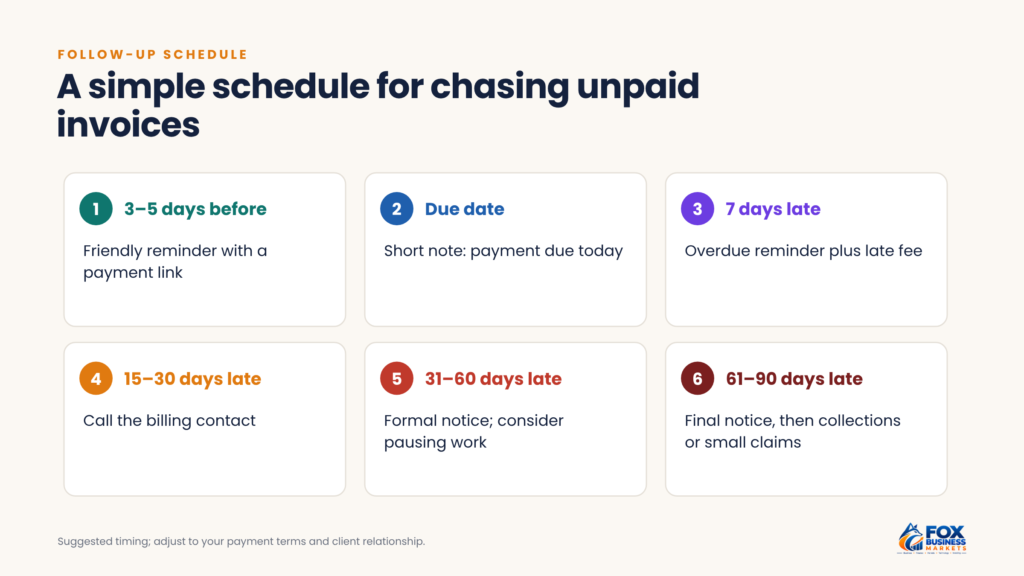
Use a consistent schedule, and keep each message polite and specific:
Timing | Action |
| 3 to 5 days before the due date | Friendly reminder with the invoice attached and a payment link |
| On the due date | Short note that payment is due today |
| 7 days late | Reminder that the invoice is overdue, with the late fee if it applies |
| 15 to 30 days late | Phone call to the billing contact to find out what’s holding it up |
| 31 to 60 days late | Formal written notice; consider pausing work |
| 61 to 90 days late | Final notice, then a collection agency, small claims court, or legal advice |
Keep records of every invoice and message.
Sample reminder email
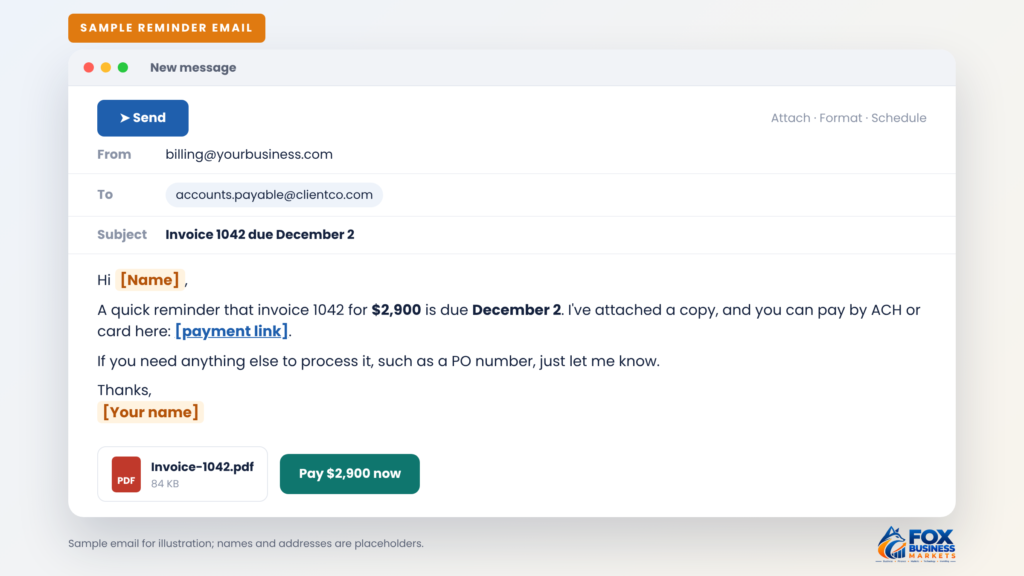
Adapt this script for the reminder you send before the due date:
Subject: Invoice 1042 due December 2
Hi [Name],
A quick reminder that invoice 1042 for $2,900 is due December 2. I’ve attached a copy, and you can pay by ACH or card here: [payment link].
If you need anything else to process it, such as a PO number, just let me know.
Thanks, [Your name]
Sample reminder email
For overdue reminders, change the subject to “Invoice 1042 is now past due” and state how many days late it is and any late fee your terms allow.
How Do Invoices Affect Your Cash Flow and Taxes?
Invoices drive your cash flow. Revenue isn’t cash until clients pay, so a business can be profitable on paper and still run short of money. Track accounts receivable weekly, and watch how long clients take to pay on average. Our guide to cash flow management explains how to forecast around payment timing.
Invoices are also tax records. Keep copies of every invoice you send and every payment you receive, and record unpaid invoices according to your accounting method. Businesses using accrual accounting record revenue when they earn it, usually when they deliver the work and invoice for it, while cash-basis businesses record it when they’re paid. Our guide to financial statements shows how receivables appear on your balance sheet.
How Should You Number and Track Invoices?
- Use one numbering sequence. If an invoice is wrong, void it and issue a corrected one rather than deleting it, so the trail stays complete.
- Name files consistently, such as 1042_ClientName_2026-11-02.pdf.
- Log each payment against its invoice number, with the date, amount, and method.
- File credit memos and corrected invoices with the original.
Frequently Asked Questions
Do you need a business to send an invoice?
No. Freelancers and sole proprietors can invoice under their own name, though a business name and separate bank account look more professional and simplify bookkeeping. Clients may ask you to fill out a Form W-9 with your taxpayer ID before they pay. They generally must report payments of $2,000 or more in a year to you on Form 1099-NEC, up from $600 for payments made after December 31, 2025, under the One Big Beautiful Bill Act. Keep a completed W-9 ready to send with your first invoice to a new client.
Can you charge sales tax on an invoice?
Yes, if your state and the item you’re selling are subject to sales tax, you generally must collect it and show it on the invoice. Many services aren’t taxable, but rules vary widely by state. Check your state revenue department’s rules, and register for a sales tax permit before you start charging tax.
How long should you keep invoices?
The IRS generally recommends keeping business records that support your tax return for at least three years, and longer in some situations, such as when you underreport income. Many businesses keep invoices for seven years to be safe. Store digital copies in a backed-up folder or your accounting software so they’re easy to find.
What should you do if a client disputes an invoice?
Respond quickly and ask exactly which items or amounts the client disputes, then send supporting documents such as the contract, delivery confirmation, or approved change orders. If part of the invoice isn’t in dispute, ask the client to pay that portion now. Issue a credit memo or corrected invoice if you made an error, rather than editing the original.
Send Your Next Invoice Within 24 Hours
Once you know how to invoice, consistency does the rest: set up a template with every required element, add a “pay now” option for ACH and cards, and write your payment terms into every new contract. Send your next invoice within a day of finishing the work, schedule automatic reminders, and call clients a few days before large invoices are due. Track your average days to payment each month, and use our guide to small business finance to plan around it. Our payment statistics roundup shows how businesses and consumers pay today.
This article is for general information only and isn’t financial, tax, legal, or investment advice. Consider your own situation or talk to a qualified professional before making decisions.

